skip to main content
hacking.communityplay in the sandbox.
compute online · a box boots in seconds

A real Kali box,
in your browser.

A cloud-hosted penetration-testing machine you drive straight from the browser — no dual-boot, no local VM, no VPN wrestling. It boots with the full offensive toolchain and a live route to your lab targets, so you go from "let me try this" to a root shell in seconds — on any laptop, even a Chromebook.

no install no VPN setup from $4.99
attackbox · hacking.community
// what's inside the box

Everything loaded. Nothing to configure.

Kali
rolling — full offensive build
Dedicated
isolated microVM per session
Persistent
your notes & loot survive a session
// pre-loaded toolchain
nmapffufgobustersqlmapBurp SuiteMetasploitHydraJohnHashcatNiktowpscanimpacketBloodHoundpwntoolsGhidrawfuzznetcattcpdump+ the rest of the Kali repo
// two flavours

Linux and Windows / Active Directory.

Most platforms stop at Linux. We also give you real Windows & AD lab boxes — practise Kerberoasting, AS-REP roasting, BloodHound paths and lateral movement against a live domain, from the same browser tab.

Kali Linux
The everyday driver
  • Full offensive toolchain pre-loaded
  • Web, network, recon, cracking, RE
  • Pro: 5 free hours every month
  • Packs from $4.99 / 5 hours
Windows / AD
The differentiator
  • Live Active Directory domain
  • Kerberoasting · AS-REP · DCSync
  • BloodHound attack-path practice
  • Packs from $12.99 / 5 hours
// not a simulation

A real box. Real root. In your browser.

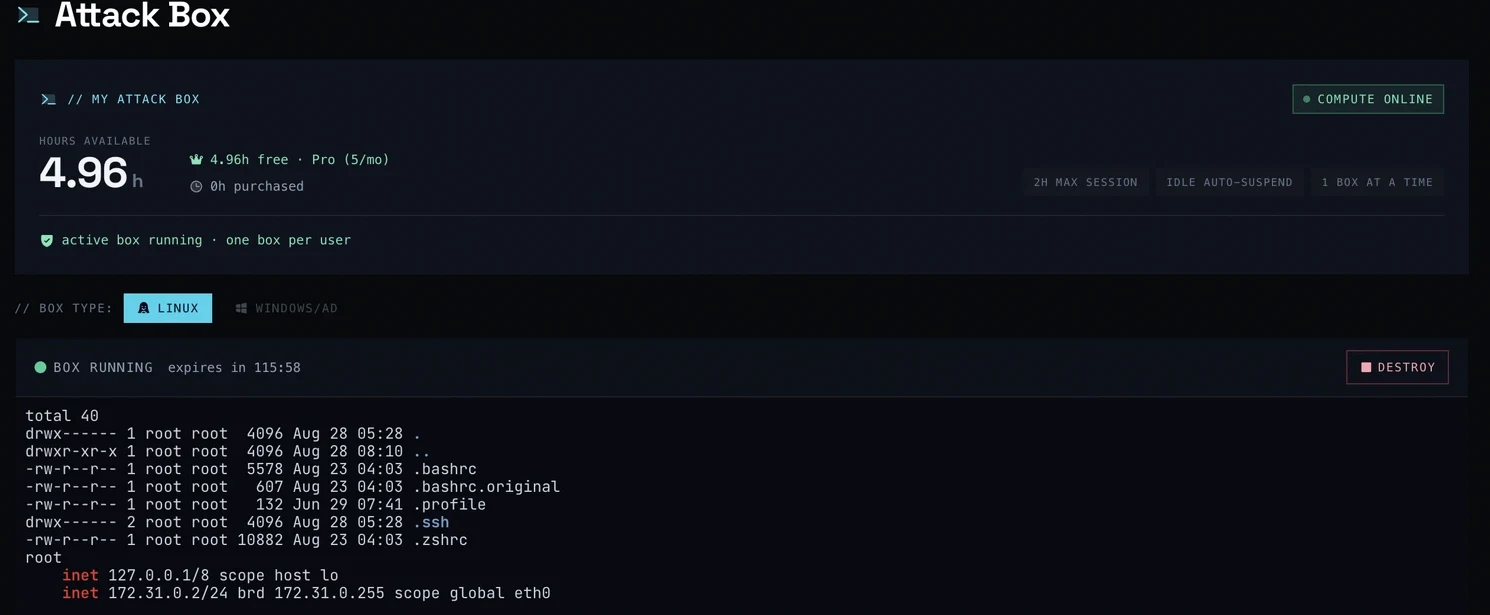
This is the actual dashboard — a live Kali box booted in seconds, metered by the hour, with a hard 2-hour cap and one box per user. Not a canned demo: your box, your root shell.

attackbox · hacking.community
Live Attack Box dashboard — a running cloud Kali box in the browser
// what people use it for

One box, every kind of hacking.

Labs & CTF
Launch any of our labs or a CTF challenge on the same network as the target — no setup between you and the shell.
Bug-bounty practice
A clean, disposable rig to rehearse recon and exploitation without touching your daily machine.
Learn a technique
Follow a writeup or academy module hands-on, with every tool it references already installed.
Cert & exam prep
Drill OSCP-style attack chains against realistic targets so exam day is just another box.
// how it works

From click to root shell in seconds.

01
Open a lab
Pick any lab, CTF or box and hit “launch attack box.”
02
Get a live shell
A private box boots in your browser, already on the target's network.
03
Pwn & submit
Enumerate, exploit, capture the flag — progress and XP sync automatically.
// session & safety

Fair, isolated, and honest about limits.

2-hour hard cap
Every session self-destructs at 2 hours — relaunch any time. No forgotten boxes burning your balance.
15-min idle suspend
Step away and the box suspends automatically, so you only spend hours you're actually hacking.
Isolated egress
Boxes reach your lab targets — not the open internet or other users. Sandboxed and torn down after use.
// pricing

Pay by the hour. Hours never expire.

// Kali Linux packs
  • 5 hours$4.99
  • 20 hours$16.99
  • 50 hours$34.99
// Windows / AD packs
  • 5 hours$12.99
  • 20 hours$44.99
  • 50 hours$99.99
card via Stripe crypto accepted — BTC, USDT, ETH, SOL + 20 more · 0% platform fee
Pro members get 5 free Linux hours every month
Plus a priority launch queue when boxes are busy.
See Pro
// faq

Questions, answered.

q_01

Is this a real machine or a fake browser terminal?

It's a real, isolated cloud box — a full Kali (or Windows/AD) instance running on our infrastructure, streamed to your browser over an encrypted connection. Everything you type runs on an actual machine with a real network route to your target.

q_02

Do I need to install anything or set up a VPN?

No. That's the whole point. There's nothing to download, no dual-boot, and no VPN config to fight — the box boots already connected to your lab target's network. Any laptop with a browser works, even a Chromebook.

q_03

How long does a session last?

Sessions have a hard 2-hour cap and suspend automatically after 15 minutes of inactivity, so you never waste hours on a box you forgot about. You can relaunch a fresh box any time.

q_04

What's the difference between Linux and Windows/AD boxes?

Kali Linux is the everyday driver for web, network and CTF work. Windows/AD boxes give you a live Active Directory domain to practise Kerberoasting, AS-REP roasting, DCSync and BloodHound attack paths — something most platforms don't offer easily. AD boxes cost more per hour because they're heavier to run.

q_05

How does billing work? Do hours expire?

You buy prepaid hour packs (Linux from $4.99/5h, Windows/AD from $12.99/5h) and hours never expire. Pro members also get 5 free Linux hours every month plus a priority launch queue.

q_06

Is it safe / can boxes attack the internet?

No. Each box is sandboxed with an egress firewall that only permits reaching your assigned lab targets — not the open internet and not other users. Boxes are fully torn down after your session ends.

compute online now

Ready when you are.

Sign in, pick a lab, and launch your box. Your first shell is a click away — no install, no VPN, nothing to configure.

box spec & session policy
Dedicated Kali box
Isolated microVM, full offensive toolchain, boots in seconds.
2-hour hard cap
Every session self-destructs at 2h — relaunch any time.
15-min idle suspend
Step away and it suspends, so you only spend live hacking time.
Isolated egress
Reaches your lab targets — never the open internet or other users.
One active box
A single running box per session keeps hours honest and clean.
// install app

Install hacking.community for fast access, offline reading, and push notifications. No app store needed.